
Imagine building a house with no blueprint. How do you know where the walls go? How do you ensure the plumbing fits before the drywall goes up? You can’t guess. You need a plan. Without a detailed design from an architect, you’re just stacking bricks.
Now picture launching an e-commerce site. You have products. You need a website. Where does the catalog live? How does a customer find your contact info? If you just throw pages together, it’s chaos. Users bounce. Sales drop. You need a structure. That structure is information architecture (IA).
It’s not magic. It’s engineering. But unlike house plans, digital IA is messy. It’s constantly shifting. Try to pin down a single definition and you’ll hit a wall. The field is too fluid. But if you stitch together the standard descriptions, you get the gist.
Information architecture is the model of an information system. It defines the rules. It dictates how content is organized, linked, accessed, and presented. It is also the art and science of building that model.
Think about a growing corporation. Their IA might just cover the public website. Or it might span everything. Marketing assets. Customer databases. Internal documentation. It’s all connected.
Still confusing? Picture an online shoe store.
Each pair of shoes is a piece of information. The store is the system. The IA is the logic behind the shelves. It’s the sizing guide. The color filters. The inventory count. The price tags. It’s the invisible grid that makes buying shoes possible without a maze.
That’s a heavy lift for a single system. This article breaks down the techniques and tech behind IA. We’ll look at how it evolved. We’ll touch on the core concepts. And we’ll see what tools professionals use to keep the digital lights on.
History of Information Architecture


Humans have spent millennia trying to keep chaos at bay. Long before the internet existed, we were already building systems to sort data. Take 330 B.C. Egypt. The Library of Alexandria didn’t just hoard scrolls; it indexed them. A 120-scroll bibliography mapped its contents. It was messy work. Later came the Dewey Decimal System. Then the Library of Congress Classification. These weren’t just labels. They were the only way to navigate growing collections.
You likely used a simpler version of this in school. An outline. Top-level headings. Sub-points. It’s the same logic. Just scaled down.
Then came computer networks. The Internet. The World Wide Web.
The rate of publication exploded. We went from manageable shelves to massive data lakes. More content is added every single day. Digital formats changed the game. Cross-referencing became instantaneous. Click a link. Jump there. No walking down aisles.
But speed creates a new problem.
When everything is accessible, finding what you need becomes the bottleneck. The task of keeping information organized feels overwhelming. Maybe impossible.
As the format of information evolves, so do our methods. We need a new framework.
Richard Saul Wurman saw this coming. He’s famous now for helping launch TED conferences. But in 1976, he was at an American Institute of Architects (AIA) conference. He coined a term. Information architecture.
He didn’t like “information design.” It sounded like it was only about aesthetics. How things looked. Wurman cared about structure. How information is accessed. How it’s used. His 1997 book cemented the concept. It wasn’t about decoration. It was about systematic functionality.
You might hear different terms thrown around. They aren’t synonyms. They are fragments of the whole.
Usability engineering focuses on efficiency. Content management handles the backend. Content strategy plans the narrative. User experience (UX) design maps the journey. Interaction design (IxD) dictates how you engage with the interface.
These are pieces of the puzzle. Information architecture is the blueprint that holds them together.
We know where the term came from. We know why it’s necessary. The universe of information is expanding faster than our attention spans. Next, let’s look at the core components that make IA actually work.


Imagine you are organizing a bookshelf. You can only pick one primary sorting rule at a time.
Put books by author? By title? By height? You can combine these, sure. But one rule always takes priority. Maybe author first, then title.
How do you choose? The goal is simple: make it easiest for readers to find what they want. In a large research library, users aren’t looking for a specific author. They are searching by subject. The context dictates the structure.
Digital information is far more complex than a shelf. The options for organizing data are vast. Yet the reason remains the same. You structure digital assets to improve user access.
Here is the problem. An approach that helps one group of users find data instantly might confuse or block another group. Speed for some means friction for others.
With digital content growing exponentially, information architecture is no longer optional. It is essential. Without it, people cannot access what they need, when they need it.
The business case is concrete. A company with optimal IA sees lower operational costs. Users spend less time hunting for files. They duplicate less work because they can actually find the original source. It is not just about neatness. It is about efficiency.
Consider the 2009 case studied by Jared Spool. He highlighted a website that increased online sales by roughly $300 million in a single year.
The trigger? Moving the login form.
Spool’s team analyzed customer interaction. They were part of the site’s information architecture redesign. The insight was straightforward. Returning customers who logged in before browsing had a smoother experience. They spent more.
First-time buyers also benefited. By removing the mandatory registration wall, more users completed purchases.
The results appeared in the first week. Simple structural changes drove massive revenue.
So, why does this matter to you? You encounter poorly designed information architecture every day. It manifests as endless clicks to find a setting. It appears as confusing navigation menus. It is the frustration of knowing a file exists but being unable to locate it.
Now that we understand the why, we can look at the how. Information architecture is a broad field. We need to start with the core concepts before diving into the techniques and tools that bring those concepts to life.
Information Architecture Concepts
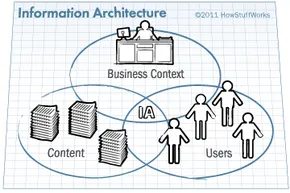

Information architecture isn’t just a buzzword. It is the structural model of an information space. The practice involves organizing and managing that data together. The model itself sets the rules. It dictates how information is maintained. It decides how elements are interlinked. It governs access and presentation. To describe an IA accurately, you need specific concepts. You cannot rely on vague definitions alone.
The industry’s bible is Information Architecture for the World Wide Web by Rosenfeld and Morville. You might know it as the polar bear book. The O’Reilly cover features a polar bear. The book’s popularity in the IA community has cemented that nickname. Professionals cite these authors as the primary authority on defining the discipline.
In the 2002 edition, they define IA through three overlapping circles. The first is content. This includes text. It includes numerical data. It includes images and videos. The second circle is users. This is your target audience. IA must account for their experience. It must factor in information-seeking behavior. The third circle is context. This covers goals and resources. It includes technology. It includes company culture. It even includes politics.
Defining the Basic Unit: Packages
Gary Marchionini offers a different lens. He is a professor and dean at the University of North Carolina at Chapel Hill. He spoke on this subject at the university’s School of Information and Library Science. He defined the basic unit of information in an IA as a package.
A package is simple. It is a paragraph of text. It is a single image. It is a video clip. It is any distinct piece of data. The IA plan must determine what these packages consist of. It must decide how they are managed within the larger system. It must define how they are accessed. For clarity, this article uses Marchionini’s term throughout.
The Role of Attributes
IA also relies on attributes. These are the details used to describe something. Think of describing a person by height, weight, or gender. Information has attributes too. They describe the packages or the objects within them.
There are physical attributes. These are concrete. An example is the number of characters in a paragraph. Then there are abstract attributes. These are contextual. An example is determining the appropriate context for displaying that paragraph.
For an IA to function, these attributes must be applied consistently. The system might also include logic for how attributes relate to each other. Consistency is not optional. It is required for efficiency.
Components Used in Information Architecture
Understanding abstract concepts is step one. Step two is examining the components architects use to capture those concepts. The polar bear book identifies four main components within an IA system:
- Organization systems define the categories for placing information. You might group data by author names and titles. Or you might sort by shoe size, fabric and color. The logic of the category is what matters.
- Labeling systems determine how we represent information. This involves selecting the appropriate level of terminology for the audience. Should an article use “optometrist” and “ophthalmologist”? Or is “eye doctor” more appropriate? The label must match the user’s mental model.
- Navigation systems control movement from one piece of information to another. On this page, you use the Next button to advance. You also use tabs like Adventure and Tech at the top to explore new topics. Navigation is about movement.
- Searching systems are how we find specific information. This involves entering words in a search engine. It involves scanning for terms in a numbered list. In the search box here, you can type multiple words. This narrows results. It brings you closer to the topics you want.
These components are not the whole story. Other elements come from the technology used to make the model live. If you store information in a database, the architecture requires a querying component. You need a way to retrieve specific pieces of data. If you build a website, accessing information relies on browsing, scrolling, and clicking. These are the mechanical actions of the user.
The job is massive. An information architect must be a jack-of-all-trades. Consider a regular architect designing a house. They must know established architectural standards. They must understand government regulations. Builders need to read the blueprint. The building must pass legal inspections. The finished house must be safe and desirable.
An information architect needs similar diversity. They must understand industry standards for creating, storing, accessing, and presenting digital information. Standards include Unified Modeling Language (UML). They include Hypertext Markup Language (HTML). They include Cascading Style Sheets (CSS) and JavaScript. Common industry practices are equally important. Architects use controlled vocabularies. They use metadata. This ensures each category label means only one precise thing. It prevents ambiguity.
Designing an Information Architecture
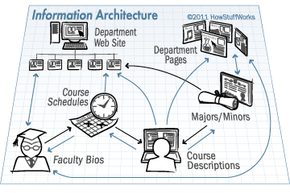
Documenting the Blueprint
An information architect doesn’t just design; they document. Think of it as the blueprint phase for a building. You need a written record so every developer and designer knows exactly what rules to follow. This documentation isn’t just for the build team. It’s a reference guide for maintainers who have to keep the system from falling apart years down the road.
The architect records specific details. They describe package types and their attributes. They map out relationships between those packages. Flowcharts show how a user’s decision at one step pushes them to the next. Wireframes illustrate the visual layout. If the design needs approval from a board or manager, the architect might even prepare a slide show for the meeting.
Sketching and Modeling
Early on, the process is messy. Architects brainstorm by sketching on paper or sticky notes. A whiteboard helps them think through quick changes without committing to code.
Once the plan solidifies, they switch to modeling software. Tools like Visio, OmniGraffle, or Dia create visual representations of the structure. They map user navigation paths. They show how information trees branch out. These graphics become part of the final documentation, often refined using desktop publishing tools like Adobe Illustrator.
There is also specialized software for specific IA tasks. These tools help test the user experience (UX) and navigation before a single line of code is written.
- Optimal Sort helps architects choose the best categories and labels by analyzing how users interact with content.
- Treejack tracks click-through paths to see where users get lost in the site structure.
- Axure RP allows for the creation of interactive prototypes using a wireframe approach.
- Morae tests existing sites to measure effectiveness and identify UX friction points.
Putting Information Architecture into Action
Design is useless without implementation. Information system software bridges the gap between the architect’s vision and the live website. This software generally falls into two buckets: modeling tools (which we just covered) and the actual system builders.
The heavy lifters here are Content Management Systems (CMS). A CMS combines the functions of a file system and a library. It lets users check out content, update it, and check it back in. It tracks revisions over time. If you need an older version, you can retrieve it. Other software can pull this content into documents or display it on web pages dynamically.
Two popular CMS options illustrate the range of choices available. Drupal is a free, open-source platform written mostly in PHP. It is famous for its flexibility. Its real strength lies in its out-of-the-box features and free extensions, which are often essential for implementing complex IA structures. Alfresco, by contrast, is a subscription-based system. It goes beyond simple web content to manage an organization’s entire internal document and records management.
Choosing the Right Tools
CMS platforms aren’t the only way to implement an IA. Many organizations use simpler tools that function like lightweight CMSes.
WordPress is often used for blogs but can handle structured content. MediaWiki runs collaborative wikis. Both have more limited options for storing and categorizing information compared to full-scale systems.
Then there is the Document Management System (DMS). It’s similar to a CMS but more restrictive. A tool like KnowledgeTree focuses on preserving the original format of a document. It tracks the author and timestamp for every single revision. When searching within a DMS, the system typically relies on tags rather than indexing the full text of the documents. This makes it precise but less flexible for discovery.
The Cycle of Change
Information is not static. It grows. It changes. It evolves based on user needs.
For the architect, this creates a continuous loop. They must constantly evaluate whether the current IA still fits the volume or type of data. They must watch for shifts in who is using the system and why. When the design no longer fits, the architect has to decide two things. First, how to update the model itself. Second, whether the current software stack can support that change or if it needs to be replaced.
The system is never really finished. It just reaches a temporary state of equilibrium before the next wave of data forces a redesign.
The Culture Behind The Structure
The whole “information architecture” label didn’t just appear out of thin air. It was a reaction to the chaotic web explosion of the 1990s. Richard Saul Wurman dropped “Information Architects” in 1996. That book gave the field a name. But the culture? That grew from argument.
Peter Morville remembers the heated debates. He and his colleagues were trying to mash up library and information science (LIS) principles with Wurman’s new concept. It wasn’t settling nicely. Then O’Reilly published Morville’s book, co-authored with Louis Rosenfeld. Sales spiked. Interest followed.
By 2000, the community was ready to meet. Richard Hill of ASIS&T helped Rosenfeld organize the first annual Information Architecture Summit. It’s been held every year since. Workshops. Innovators. Respect. The 2011 conference dove into specific techniques and the future of the field.
Global Conferences And Professional Bodies
The momentum didn’t stop in the US. The growing obsession with information architecture design sparked similar events elsewhere. EuroIA started in Europe. Oz-IA popped up in Australia. They aren’t just copycats. They adapt the core principles to local digital ecosystems.
Then there’s the Information Architecture Institute (IAI). It’s a professional organization. Its goal is simple: advance the field. They run IDEA: Information Design Experience Access. It’s another annual gathering for those serious about structure and meaning.
Who Actually Does This Work?
Adelle Frank at Emory University knows the type. She manages the data behind the Emory College website. She’s been to two IA Summits. Her description of the typical architect is spot on.
“A quirky, intelligent individual who combines tech-savvy with good social skills and creativity.”
These people love chaos. They hate it. They take the messy overload of the internet and impose order. They make the internet bearable. Frank notes that IA enthusiasts are obsessed with improving how people experience the web. It’s not just about code. It’s about human perception.
You don’t need the job title “Information Architect” to belong. Many people do this work without the label. They share the same passion. They stay plugged in through RSS feeds. Mailing lists. Podcasts from the conferences. Articles. Membership in ASIS&T and IAI.
Twitter matters too. During events, the chatter happens in real-time. If you can’t be there, you can still follow the pulse. It’s a tech-savvy crowd. They communicate constantly.
Beyond The Basics
This article has touched on the history. The concepts. The techniques. The technology. It’s only the surface. Information architecture is massive. There is tons of literature. Some for newcomers. Some for veterans.
If you want to go deeper, the field is vast. You have to dive in. The community is waiting.