

WBFS Manager is a free utility designed to make managing WBFS-formatted drives easy. This format was created specifically for the Nintendo Wii. Its original goal was simple. Store and back up Wii games on external drives. It optimized space and simplified backups. WBFS Manager centralizes this process for Windows users. You can transfer, organize, or delete games quickly. It works directly on your PC.
The interface is intuitive. Adding or deleting games is accessible. You do not need advanced technical skills. The software creates reliable backups of your games. This secures your digital library. It also handles ISO file transfers. Move files between your hard drive or USB stick. Compatibility is broad. It supports Windows XP, Vista, 7, 8, and 10. The tool is versatile. It is durable.
Why WBFS Manager Matters for Wii Owners
The tool gained popularity among Wii users. Its efficiency is key. It automates complex management tasks. The community praises its speed. The program is lightweight. Installation takes just a few steps. No complex configuration is needed. Connect a WBFS disk. Start managing files immediately. The process is secure.
WBFS Manager automates tedious management tasks that would otherwise require complex technical manipulations.
Compatibility and Installation Guide
WBFS Manager targets Windows systems. It runs on XP through Windows 10. This covers many machines. It does not have an official version for Mac OS or Linux. Advanced users can use virtualization. Wine on Linux might work. Virtual machines are another option. These require technical skill. They do not guarantee a smooth experience like Windows does.
Installation is direct. Download the executable from a reliable source. Futura-Sciences is one option. Follow the installer instructions. The process takes minutes. No complex settings are needed. Admin rights are usually unnecessary. Connect your storage device before launching. WBFS Manager will detect it immediately.
Updates and Maintenance
Updates have slowed down. Official support has ended. Developers are no longer pushing rapid changes. You can still find stable versions. Older versions are available too. Check reference sites or community archives. There is no automatic update mechanism. Check manually for newer versions. Install them if needed. This keeps you safe. It avoids known bugs and security flaws.
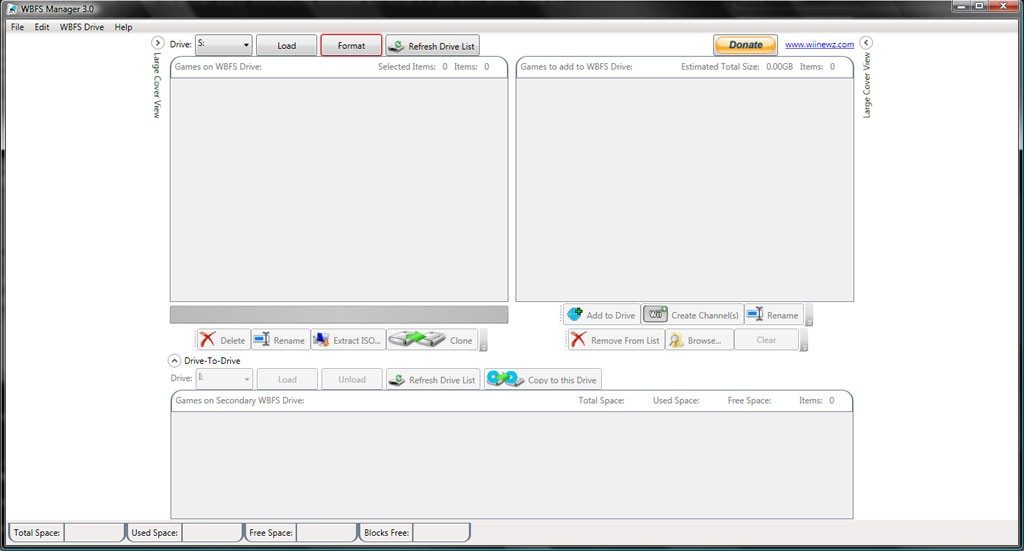

Most modern tools like Wii Backup Manager claim to be the end-all-be-end for disc management. They handle FAT32, NTFS, and other formats with ease. It’s a universal approach. But universality comes with clutter. WBFS Manager strips that away. It doesn’t try to be everything. It focuses strictly on WBFS. The interface is bare. There are no upsells. No premium tiers. Just the code needed to move games.
This simplicity is a feature, not a limitation. For users who just want their library intact, it works. Others might need to rename files or organize by genre. You can find tools for that. They’re more complex. They demand more from you. WBFS Manager doesn’t.
The Cost of Complexity
Let’s be clear about pricing. Other utilities often hide features behind paywalls. Some inject ads. You pay for convenience elsewhere. Here, you pay nothing. The software is open source. You get every function immediately upon download.
Who benefits from this? Students. Casual gamers. Families preserving a collection. It’s accessible to everyone. There is no “Pro” version. There is no educational discount because the full version is already free. This explains its staying power. Retro gaming communities rely on it. You’ve likely had a Wii for years. Your discs might be failing. This tool helps you migrate and organize without losing data or money.
It’s not just about saving cash. It’s about stability. The lack of commercial pressure means fewer broken updates. It means a tool that does one thing well.
Managing ISOs Without the Headache
The core function is backup and transfer. That’s it. Importing ISO files is straightforward. Moving games between drives takes seconds. Deleting titles you no longer play is instant. But you retain control. The structure of your disk remains predictable.
You can automate backups. This is critical. Hardware fails. Disks corrupt. Having a secure copy is your safety net. It limits risk. It turns a potential disaster into a minor inconvenience.
The Risk of Formatting
Here is where people mess up. Formatting a drive to WBFS wipes it. Completely. Every byte. Gone.
If you plug in a drive full of photos or documents, you better back those up first. The software’s interface is clear. It guides you. But if you rush, you can hit the wrong button. The design helps prevent accidental format commands on sensitive drives. But human error is still human error.
Use quality storage media. Cheap USB drives fail. Verify file integrity after copying. Don’t skip the check. It takes a few minutes and saves hours of panic.
Long-Term Reliability
The app is stable. It doesn’t get frequent, aggressive updates. That sounds like a negative. It’s not. It means the core functionality is solid. You don’t need to chase the latest patch to keep your game working.
Download from trusted sources. The internet is full of repackaged, potentially malicious versions. Stick to the official repositories or well-known community mirrors. If you hit a snag with a new OS, check the user forums. The community is active. They’ve solved these problems before.
It remains the reference choice on Windows. Not because it’s flashy. Because it’s reliable. You know what you’re getting. No surprises. No hidden fees. Just your games, safe and organized.
Why do we keep coming back to older tools? They work. They don’t try to change your habits. They just help you keep what you’ve built. The library stays intact. The process remains predictable. And the data? It stays yours.
What Is WBFS Manager and Why Do You Need It?
You’re holding an external drive stuffed with Wii ISOs. It’s full. You need space. The answer is WBFS Manager. This isn’t some corporate bloatware. It’s a lightweight utility. Specifically designed for Windows users. It handles WBFS partitions. And yes, Wii ISO images.
The goal is simple. Manage your game backups without frying your hard drive.
It relies on a straightforward graphical interface. No command line required. You don’t need to be a coder to use it. In fact, you don’t even need an internet connection. The tool works entirely offline. Once downloaded, it’s yours.
“This utility targets Windows users managing WBFS partitions and Wii ISO images, operating without internet connectivity.”
System Requirements and Installation
Before you download anything, check your setup. It’s not demanding. But it has specific needs.
The software runs on Windows. Both 32-bit and 64-bit versions are supported. If you’re on an older PC, you’re covered. If you’re on a modern tower, you’re covered. It supports both x86 and x86-64 processor architectures. That’s standard fare.
The installer size is small. A few megabytes. Variable depending on the distribution source. But there’s a catch. You need the .NET Framework. Microsoft’s runtime. It’s usually already on your machine. If not, you’ll need to install it. It’s a standard component. Most modern Windows installs have it by default.
Installation is flexible. You get a classic Windows installer. Or an archive file. The portable version is handy. It lets you run the tool from a USB stick. No registration. No messy registry entries. Just unzip and run.
Compatibility and Permissions
This tool isn’t just for internal drives. It works on external hard drives. SSDs. Even USB flash keys. As long as the device supports the WBFS format. Or can be formatted to it.
You need write access. This is non-negotiable. If you want to format the drive. Or transfer files to it. The OS must grant write permissions. Otherwise, the operation fails. Simple as that.
What about Linux or macOS users? You’re not entirely out of luck. The software is technically Windows-native. But it can run via virtualization. Or through Wine. It’s not native support. It’s a workaround. But it works.
The Legal Gray Area
Here’s the thing about Wii ISOs. Copyright law is messy. WBFS Manager itself is free software. Open source. Built by a community project. But how you use it matters.
The intended use case is personal backup. For games you own. For preservation. Not for piracy. The license and usage conditions align with legislation regarding personal copies. Know the rules in your region. Don’t use this to distribute copyrighted material.
Why It Still Matters in 2024
You might ask. Why use this? Why not just keep the ISOs on a standard NTFS drive?
Space efficiency. WBFS compresses game data. It strips out unused content. You save significant storage. A game that takes up 4GB as an ISO might shrink on a WBFS partition. That’s the core benefit. For collectors. For retro gaming enthusiasts. It’s essential.
The project is community-driven. No corporate agenda. No subscriptions. It does one thing. And it does it well. Manage your Wii library. Efficient


