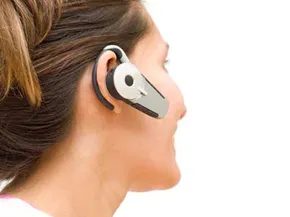
Most people treat Bluetooth as a convenience tool. You clip on a headset. You drop a call. You go about your day. Others push the tech harder. They sync their homes. Their offices. Their cars. Then there are those who ignore it entirely. The reality is that this technology is far more complex than a simple pair of earbuds. It is a miniature web of communication.
Bluetooth works by using short-range radio waves. The standard reach is about 10 meters. That is 30 feet. Some high-powered variants go further. You do not need line of sight. You do not need to point a remote at a TV. Just being in the same general area is enough for devices to find each other.
The Mechanics of a Piconet
When these devices connect, they form a piconet. This is a type of personal area network (PAN). Think of it as a tiny, temporary club. Usually, no more than eight gadgets belong to this group. They follow strict connection protocols. These standards keep the chaos in check.
One device acts as the master. The others are slaves. The master directs traffic. The group detects each other’s presence constantly. They pass data back and forth. They coordinate activities in real time.
How do they avoid talking over each other? The answer is frequency hopping. The devices jump between radio frequencies along a specific band. It happens so fast you cannot see it. Low-power signals are used to cut down interference. If two signals cross paths briefly, the hopping ensures the connection holds. The system is designed to ignore minor crossovers.
Everyday Hardware and Efficiency
The list of compatible hardware is long. You have cell phones. Personal computers. Printers. Cameras. The scope expands to include home phones. Entertainment systems. GPS navigators. MP3 players. Any of these can join the network.
The value proposition is clear. Bluetooth offers an inexpensive automated system. It brings flexibility to electronic communication. It adds efficiency. For the average user, this means fewer cables. It means less clutter. It means your devices work together without manual intervention.
Driving into the Connected Car
This efficiency extends beyond the desk. Consider the automobile. A Bluetooth car stereo does more than play music. It transforms the driving experience. It allows for hands-free calling. It streams audio without wires. It integrates your phone’s data directly into your dashboard.
The next logical step is understanding how this integration changes daily commutes. We will look at the specific capabilities of connecting your audio system to your mobile device.
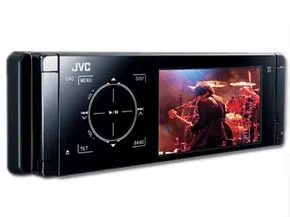
Once you grasp the basics, the real utility of Bluetooth emerges inside your vehicle. These systems integrate directly with your smartphone, creating a communication bridge when the devices are within range. The experience varies by model, but the goal is always reduction of distraction.
High-end units allow for hands-free calling without touching your screen or pressing a single button. Audio routes through the car’s speakers, isolating the conversation from the road noise. Even if your stereo requires manual initiation, the process is generally faster than navigating a cell phone menu while driving. Many systems also mirror your phonebook, incoming call logs, and status indicators onto the stereo’s display.
When a call comes in, the system automatically ducks the music or movie volume. It pauses playback entirely during the chat, then resumes exactly where it left off.
“Many places now enforce laws limiting the use of cell phones while driving, and Bluetooth car stereos are one way to bridge the middle ground.”
Some advanced Bluetooth car stereos store your entire address book locally. Others feature built-in telephony that copies data directly from your SIM card, effectively taking over calling functions. This disconnects your phone from the piconet. The result is twofold: your phone saves battery power, and the audio link between the stereo and the car remains stronger and more stable.
This isn’t just about convenience. It’s largely driven by necessity. For those who can’t bear to be on the road without checking in, these systems offer a legal loophole in the form of safety. With strict laws against handheld phone use in many jurisdictions, a Bluetooth setup provides the necessary middle ground.
Beyond voice, Bluetooth car stereos enhance the interior environment. Transmitters stream music from iPods, MP3 players, and satellite radio directly into the head unit. No tangled cords. No loose wires.
Video capabilities exist, too. Some models feature full-color LCD displays. However, this is usually disabled while the vehicle is in motion to prevent driver distraction. If you have passengers in the back seat who need to be kept busy, many Bluetooth-enabled units include the necessary hookups to turn the vehicle into a mobile entertainment hub.
Connections for GPS navigators and USB flash drives are standard fixtures now. The hardware is becoming less of a novelty and more of a baseline expectation.
Comparing modern Bluetooth-enabled car stereos to cassette decks feels like comparing a smartphone to a rotary phone. The evolution is rapid. Each year brings tighter integration and higher fidelity.
If this overview has you ready to upgrade, the next step involves practical considerations. Before you walk into an electronics store, there are specific factors you need to weigh.
Buying a Bluetooth Car Stereo
Choosing the Right Bluetooth Car Stereo Setup
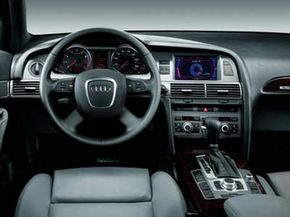
Factory-installed Bluetooth in new cars is convenient, but it’s not the only path to wireless audio. If your vehicle lacks built-in connectivity, you have two main routes: universal adapters or specific stereo replacements. The trade-off is real. Universal adapters are cheaper and easier to grab, but they usually offer limited functionality. Stereo-specific units, whether aftermarket replacements or factory-integrated systems, tend to be more advanced. They often support full phone control, high-quality music streaming, and deeper integration with the car’s existing interface.
The catch? Some cars make swapping out the stereo a nightmare. If your climate controls or other vital systems are linked to the head unit, ripping it out could cause more headaches than they solve. You also need to be honest about your tech comfort level. If you aren’t particularly tech-savvy, a complex Bluetooth car stereo might be more trouble than it’s worth. Hands-free calling is useless if you spend ten minutes fiddling with buttons just to get a call through. Test the controls. Make sure the interface makes sense to you before you spend the money.
Verifying Compatibility and Security Features
Before you buy, check the feature list against your needs. Buying an expensive unit and discovering it can’t connect to your phone during a test drive is a waste of time and cash. Bluetooth is a universal standard, but that doesn’t guarantee compatibility between older stereos and newer smartphones. Verify that your devices will play nice. Look for theft protection too. Some models have removable faces or flip-around designs to deter thieves, which adds a layer of security for your gear.
The Risk of Eavesdropping and Hacking
There is a darker side to wireless connectivity in vehicles. Because Bluetooth operates on radio waves, it is vulnerable to remote interference. Hackers can exploit this to steal passwords or hijack connections. One notable threat is the Car Whisperer attack. This exploit allows a malicious actor to listen in on unencrypted Bluetooth networks inside a car. They can eavesdrop on phone calls or even join conversations between the driver and passengers.
The nonprofit Trifinite Group demonstrated this vulnerability. They showed that unprotected devices are at significant risk if a hacker is nearby. The effective range for these attacks can be surprisingly large, especially if the attacker is following the target vehicle. Strong password encryption and updated security protocols from manufacturers are the primary defenses against these kinds of breaches.
Staying Safe with Wireless Connections
To mitigate these risks, users must take proactive steps. Ensure your Bluetooth devices use strong, complex pairing codes. Keep your phone and stereo software updated to patch known vulnerabilities. If your vehicle’s Bluetooth system feels insecure, consider using a wired connection for sensitive communications. The convenience of wireless tech is real, but so is the exposure. Stay alert.