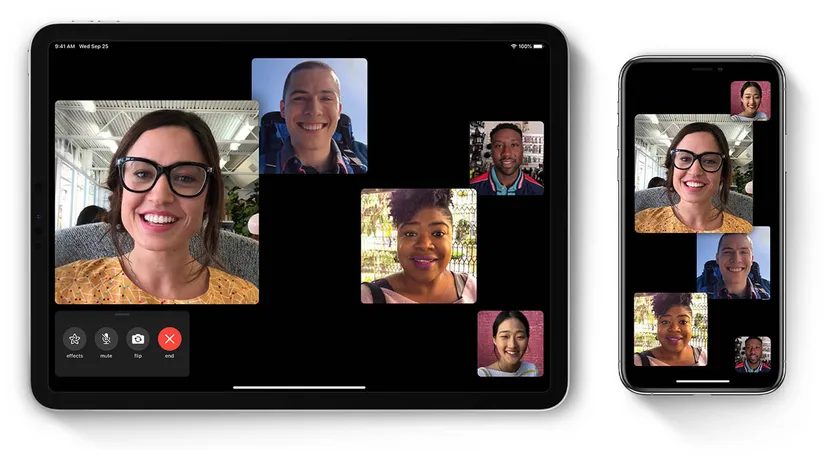
My mom uses her Facebook Portal to call me. I hear her dog, Mocha, barking in the background. My niece pops into the frame to say hi. I hold up my English bulldog, Rhyis, to the grandma she has never met.
We do this every day. It is a routine spanning more than 3,000 miles. She lives in Clarkesville, North Georgia. I am in San Clemente, Southern California.
It is the next best thing to being together.
We did not start this because of the coronavirus. We are not doing it because social distancing forced us to stay home. We do it because staying in touch matters. This method of reaching out and touching each other virtually is more important today than ever.
If you are trying to bridge that gap, you need tools that work. Simple tools. I have compiled a list of apps to help you maintain contact with loved ones. No matter how far away they are.
Why FaceTime Remains a Top Choice
If you have an iPhone, iPad, or Mac, you already have the tool. Apple’s built-in FaceTime app lets you video chat with any contact on the Apple platform.
It is primarily for video. But it works for audio calls too. Use it when you have a WiFi or data connection but poor phone signal.
Group calls are the real draw. FaceTime allows up to 32 people to chat at once. You just need iOS 12 or later on almost all iOS devices.
Google Duo vs. Hangouts
Google splits its video chat strategy. Duo is for mobile. Hangouts is for desktop.
Duo works on Android phones, iOS smartphones, tablets, and computers. You can chat with up to eight friends at a time. It uses your phone number. It accesses your contact list to build groups.
The standout feature is Knock Knock. It gives you a preview of the caller. The camera on the other end fires up before you even answer.
Hangouts is different. It supports messaging and group chats. It has voice and video capabilities. It is built into Google+, Gmail, YouTube, and Google Voice. It runs on iOS, Android, and online.
Use Duo on the go. Use Hangouts at your desk.
Marco Polo for Asynchronous Chats
Sometimes you cannot talk in real time. The other person has a busy work schedule. Or they live in a different time zone.
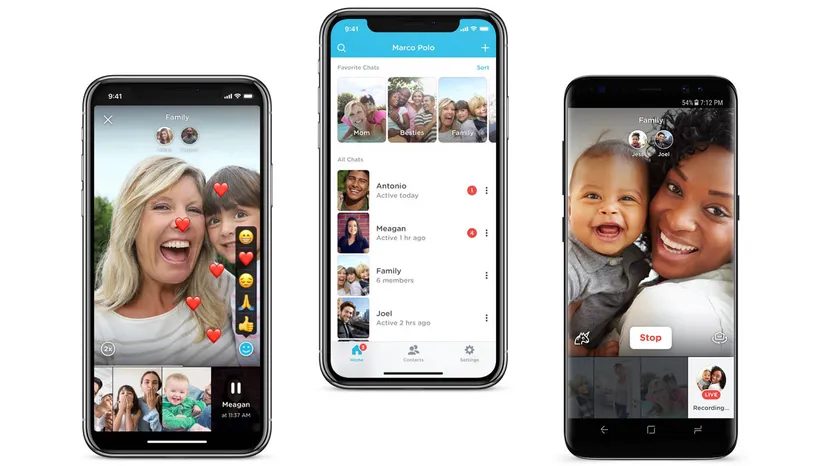
Marco Polo solves this. It combines texting, social media, and video chats on one platform.
You send video messages. The recipient watches and responds at their leisure.
The app saves all your video messages. It does not limit video time. You can revisit past conversations anytime.
Add filters. Use voice effects. Make your friends laugh.
“Marco Polo is the app for you if you want to video chat but can’t do so in real time.”
These tools are simple. They are easy to use. They keep you connected.
What happens when the battery dies? Or the internet cuts out? That is a problem for another day. For now, the connection holds.
Staying Connected: Skype’s Persistent Utility
Skype remains a stubbornly relevant player in the crowded instant messaging landscape. It isn’t the shiny new toy, but it works. The platform supports one-on-one and group conversations across a dizzying array of devices. You can log in from a mobile phone, a desktop PC, a Mac, or even an Xbox and an Alexa device. The core functionality is free. You can send messages, conduct audio calls, and handle video chats with groups of up to 50 people without spending a dime.
There are paid tiers, of course. If you need to call traditional mobile numbers or landlines, or if you want to send standard SMS text messages to non-users, you pay a nominal fee. But for digital-native communication, it stays free. The interface is straightforward. Download the app for iOS, Android, Windows, or Mac. Create an account. Add friends to your contact list. Done.
The feature set has matured over the years. You can record video calls, save the files, and share them later. Live captions and subtitles are built in, which matters for accessibility or noisy environments. It’s not revolutionary. It’s just reliable.
Facebook Messenger: The Network Effect
Facebook Messenger leverages a massive existing user base. More than 1 billion people have Facebook accounts. This means the pool of potential contacts is nearly infinite. You can connect with almost anyone who has a profile. The app handles instant messages, photos, videos, stickers, GIFs, and emojis. It covers the spectrum of casual digital interaction.
The video calling capability is robust. You can make free WiFi video calls from almost anywhere with a connection. Using the app feels familiar because it follows standard instant-messaging conventions. Tap the compose button. Select the individual or group. Start typing. The barrier to entry is low because the social graph is already there. You don’t need to convince friends to join a new platform. They are already on Facebook.
This convenience comes with trade-offs, but for pure connectivity, it is hard to beat. The integration with the main Facebook ecosystem means updates and notifications stay synced. It is less of a standalone tool and more of a layer over your social identity.
Netflix Party: Synchronized Streaming
Netflix Party, now known as Teleparty, solves the “watch party” problem for the Chrome browser. It is a free extension you download on your computer. The premise is simple. You want to have movie night with friends who are not physically present. You navigate Netflix and pick a movie or TV show.
Once the content loads, you pause it. You click the red “NP” button (or the Teleparty icon). This generates a unique link. You send that link to your friends. They click it, and their player syncs with yours. You are all in the same “room.”
The synchronization is the key. If you pause, they pause. If you fast-forward, they fast-forward. The chat tool built into the extension lets you talk about the show in real-time. It mimics the feeling of sitting on the couch together. It requires Chrome, though, which limits its cross-platform appeal. For a casual group of friends on laptops, it works perfectly.
Watch2gether: The Aggregator
Not everyone has a Netflix subscription. Watch2gether fills that gap. It is a website, not a dedicated app. You head to the site and create a room. No registration is required for basic use. You start watching video content from sources like YouTube, Vimeo, Dailymotion, and SoundCloud.
The platform aggregates these sources. You aren’t limited to one service. This flexibility is its main selling point. If you want to watch a YouTube v

Before the global shutdown, Zoom was a ghost town for the average user. You might have used it for a quarterly review or a distant client call. But connecting with your aunt? Asking for medical advice? Or just killing time during a lockdown? That was never the use case. The app was niche. Professional. Boring.
Then the world changed. Overnight, it became the primary infrastructure for human interaction.
Today, Zoom is the default layer for online classes, happy hours, telemedicine, and yes, more meetings. The barrier to entry is effectively zero. You can download the Zoom Meetings license to your smartphone or computer for free. That license unlocks unlimited video meetings. Each session can support up to 100 participants. It also includes private and group chats. You know, just in case you need to whisper to someone while the boss talks about synergy.
It’s no longer a conferencing tool. It’s the living room, the classroom, and the clinic.
But connectivity doesn’t always look like a video call. Sometimes, it looks like a text.
Enter QuarantineChat. This isn’t a video platform. It’s a lightweight bridge for iOS and Android users stuck in isolation. The goal is simple: combat loneliness. You visit the site, follow a few instructions, and get matched with others who are also sitting alone, waiting for the all-clear. No cameras. No performance. Just text.
The distinction matters. Zoom handles the heavy lifting of visual connection. QuarantineChat handles the quiet need to be heard. Both emerged from the same pressure cooker. One optimized for scale. The other for intimacy.
Why did this shift happen so fast? Because when screens are the only windows, we stop treating them as tools and start treating them as spaces. And spaces need different kinds of furniture. Sometimes you need a boardroom table. Sometimes you just need a bench to sit on with a stranger.