
OpenRunner has become a popular navigation app for cyclists, hikers, and trail runners. It’s more than just a pedometer on a map. The user interface is clean and logical, and handles the messy reality of outdoor planning better than most competitors. Whether you’re mapping out a complex MTB loop or tracking a simple morning run, OpenRunner bridges the gap between desktop planning and ground-level navigation.
The real power lies in that dual presence. Create routes on the big screen over the web and instantly sync them to your phone. This is a very logical workflow. For those concerned about safety in remote locations, the integration of IGN map backgrounds is a game changer. IGN maps are the gold standard for French terrain, providing detailed terrain that you can’t get from generic street maps.
Why OpenRunner matters for serious athletes
Most GPS apps track where you’ve been. OpenRunner helps you decide where to go.
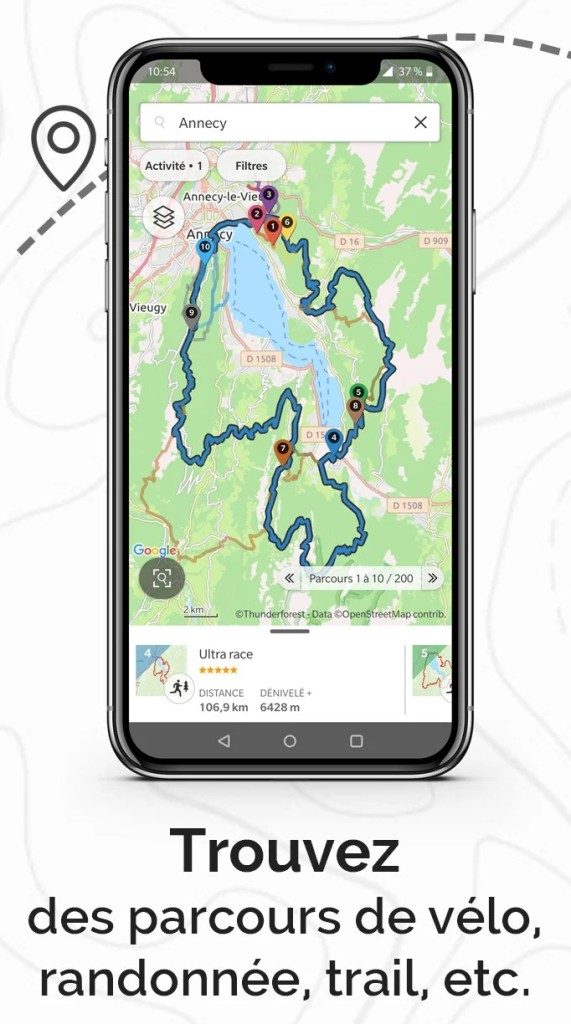
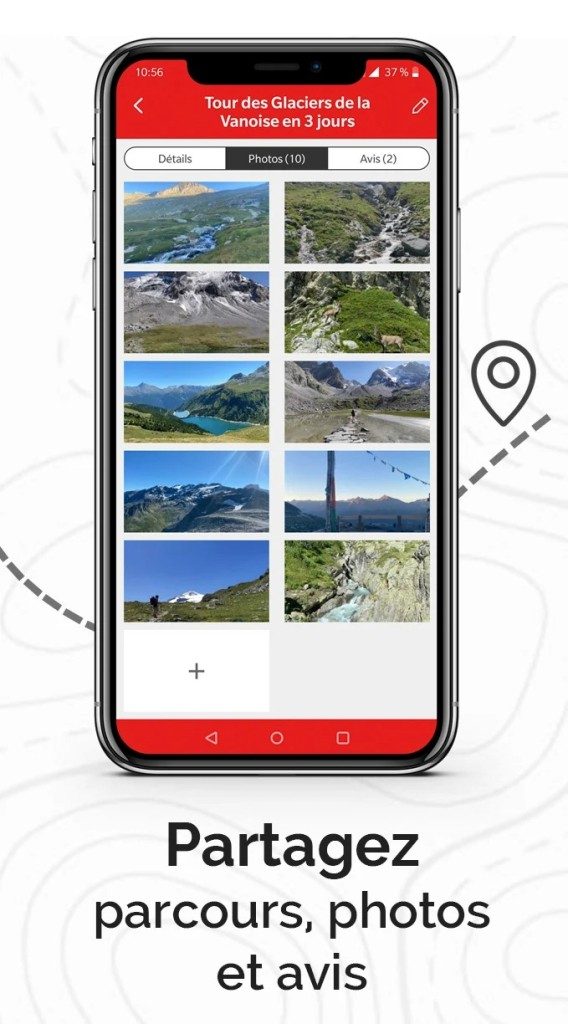
This app offers more than basic tracking functionality. Create custom circuits, analyze detailed trace data, and take advantage of a massive community database of shared routes. This social layer is not just for show. Find routes you wouldn’t have found on your own or coordinate group rides with friends using the same platform.
For beginners, it’s approachable. The tools don’t overwhelm. For pros, it’s rigorous. You get granular performance metrics and accurate altitude data. which is rare in this market, it scales with your skill level.
Cross-Platform Compatibility: Web vs. Mobile
One of OpenRunner’s most attractive features is its cross-device flexibility. You are not locked into one ecosystem.
Mobile Support
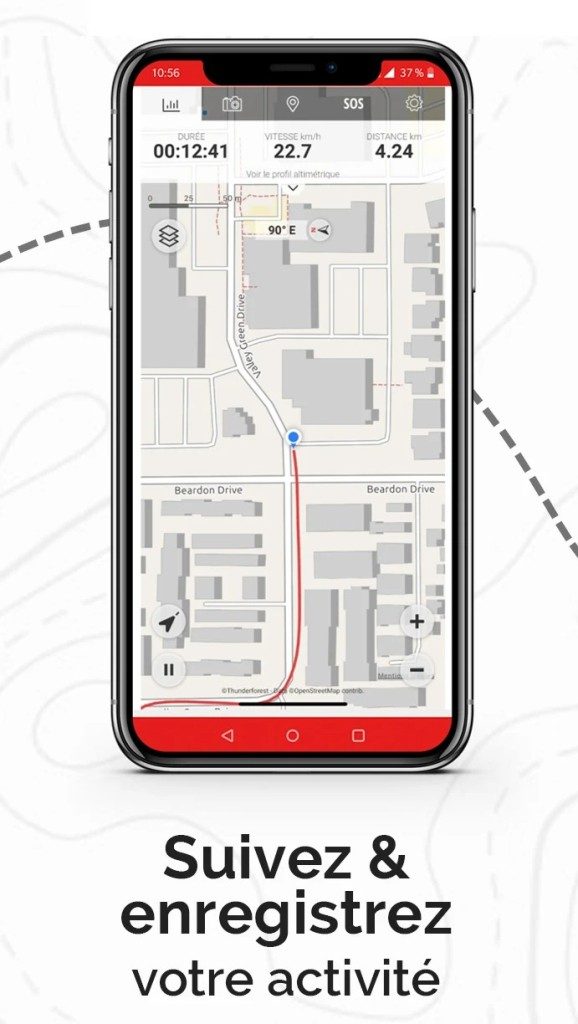
This app is available for Android (via Google Play) and iOS (via the App Store). The mobile experience is designed for the field. It is fast, responsive and designed to handle GPS signals even in dense forests and deep canyons.
Web Platform
The online version can be used in any browser on Windows, Mac or Linux. No installation required. This is very important in route planning. Drawing a 50-kilometer route with certain waypoints on a 6-inch screen is tedious. Doing this with the mouse in a desktop browser is very precise. You can import and export tracks in GPX format, ensuring compatibility with other devices and software.
Installing and using OpenRunner
Getting started is easy, but there are subtle differences in features and prices.
- Download the app : Search for OpenRunner in your device’s app store. The basic app is free.
- Create Account : Sign up to sync data between web planner and your mobile device.
- Plan on the Web : Log on to the website and plan your route. Use detailed IGN maps to ensure your route avoids private property and dangerous terrain.
- Sync and Go : Open the app on your phone. The planned route will be displayed. Start your activity.
The Premium Trap
This is the problem. The app is free, but requires a premium subscription for the most important features.
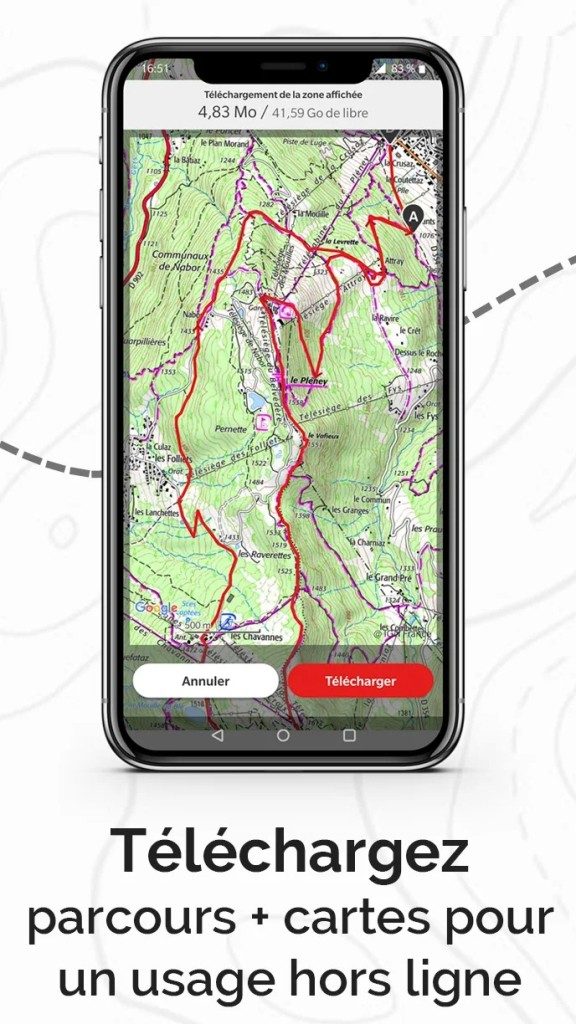
Want high-res IGN maps? This is premium. Need offline navigation so you don’t have to rely on spotty cell service in the mountains? Premium. Advanced analytics and unlimited route storage? Premium.
If you’re a casual walker, the free version might be enough. However, for serious trail runners and cyclists who rely on accurate terrain data, the paid tiers are almost mandatory. It is not a hidden fee. Although this is clearly marked, it severely limits the usefulness of the free tier.
Limitations and Considerations
OpenRunner is not perfect. First, there are no native desktop apps for Windows or Mac. You cannot download .exe or .dmg files. Everything happens inside your browser. This is useful for users who change machines frequently, but can be frustrating for users who want their own software.
In addition, the community aspect is large, but mainly focused on Europe. If you’re hiking in a remote part of Asia or South America, you’ll find that there are fewer pre-made routes to choose from than platforms like Komoot or Strava.
However, OpenRunner is still the best choice for those operating in areas covered by IGN Maps or those who appreciate a seamless web-to-mobile workflow. Durable, accurate and designed for those who are serious about the outdoors.
The question is not whether you need a another GPS app. The question is whether you need one that respects your time and your terrain. OpenRunner leans heavily on the latter. Whether the subscription price is worth it depends on how often you step off the pavement. For most people, the answer is yes. For others, the free tier is just a small part of the possibilities instead of the whole package.


The True Cost of OpenRunner: Free and Premium Features
First, the billing problem is addressed. OpenRunner won’t be hiding behind a paywall anytime soon. The free tier is surprisingly feature-rich and designed to cater to the average user who wants to plan a weekend trail run or casual bike ride. Get a core set of tools for creating routes, GPS tracking and sharing your progress. You can also use a standard map backgrounds. This works on most paved roads and marked hiking trails. For casual enthusiasts, that’s enough to keep moving.
However, if you are pushing into the wild, you’ll hit the cap with the free version.
This is where OpenRunner Premium comes into play. This is more than just a “professional” sign. This is a functional must-have for serious athletes and tour guides. The biggest opening? Get unlimited access to IGN map layers. If you’re navigating Europe’s dense forests or unmarked mountain trails, a generic map can be disappointing. IGN data provides the real terrain data you need. Then there is the offline mode. If the signal drops out at 2000 meters, you either have a plan or something is wrong. With the Premium version, you can download maps in advance, so network coverage doesn’t matter. You also get advanced performance analytics and relief tools that analyze altitude gain in ways basic trackers can’t.
Prices are not fixed globally, they are listed on the official website and can be adjusted with monthly or annual subscriptions. Pay only for what you use.
What about the students? Or are you a non-profit organization looking to cut costs? Currently, OpenRunner does not offer special discounts for educational or associative use. If you are a student-athlete, your fees are the same as everyone else. However, the free version covers most non-professional use cases, so you probably won’t need to spend a cent. Just keep an eye on updates. Developers regularly bring fixes and features to mobile apps and portals. You can force an update from the App Store or check from the web dashboard that you are not using outdated code that can drain your battery or prevent you from taking advantage of new features.
Learn the tricks: no support, guidance or certification required
OpenRunner’s strengths go beyond software. It’s the ecosystem that surrounds it. Community support is intensive, with an official FAQ covering technical details such as handling GPX files, track synchronization issues, and app compatibility.
There is one hard and fast rule. There is no official way to download older versions of the app. The developers stick to the latest version. It’s not just new toys. It’s about safety and full feature access. If you try to restore an “old reliable” version, you are vulnerable and blind to current tools. Stay in the present moment.
There are plenty of resources for those who watch and learn. Tutorials range from basic account creation to complex GPS data usage. Written by our team or contributed by the community, these guides guide you through route creation and sharing protocols. It’s self-paced. No classroom required.
Are there any certificates? No. Official OpenRunner certifications are not recognized by sports organizations or employers. Mastery comes from repetition. Use tools. Plan your route. Track your run. Share the data. After a dozen sessions, you will be able to understand it better than anyone else.
This approach has a reputation for reliability. OpenRunner has become a must-have for cyclists, hikers and trail runners who need a no-fuss tool. Cross-platform compatibility means your data is follows you from phone to your laptop to the web. This is a durable solution for environments with many undeveloped applications. Get support you can count on as you prepare your routes, log your sweat and share your passion with a community that understands the terrain.
The question remains. Are you satisfied with the surface or do you need to dig deeper? The map is there. Data is waiting. You have to decide if you need more than free.
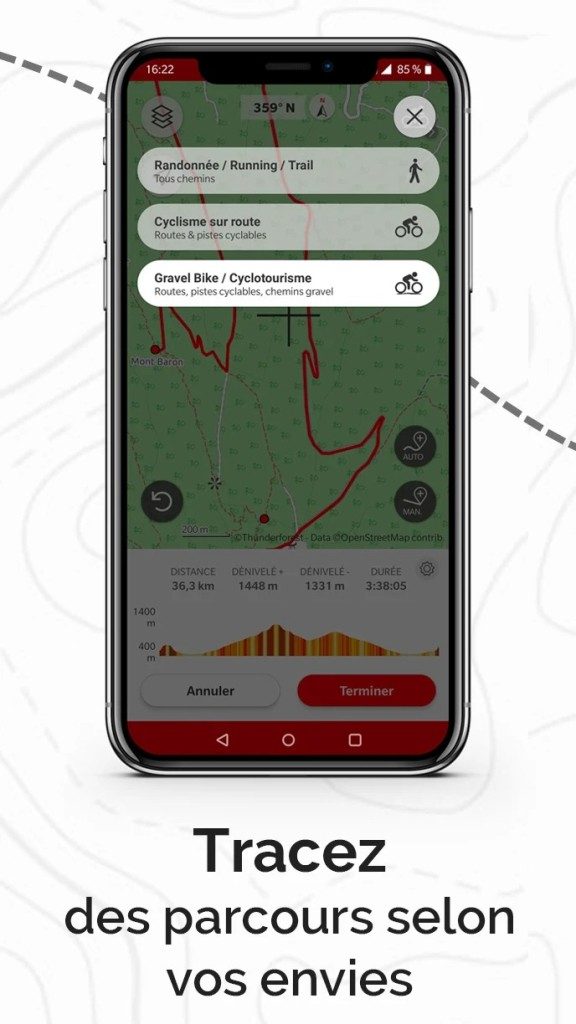

OpenRunner specs: hardware, maps and sync
You don’t need a GIS degree to judge whether a particular application is suitable for a cycling backpack or a hiking backpack. All that is needed is knowledge of what is being executed and where the offline data is located. OpenRunner has a narrow but unique niche in the crowded GPS sports market. It’s not just a tracking app. It is primarily a route planner and secondly a navigator.
The main attraction is its hybrid nature. You design on a large screen. You execute on the small one. This workflow is important for trail runners and mountain bikers who need precision before hitting the singletrack. What follows is a breakdown of the technology pillars that make this possible.
System requirements and platform availability
OpenRunner – GPS: Cycling, hiking, trails and running designed for movement. It is not a desktop tool. There is no need to install special software for Windows or macOS. You can access the design part with any modern web browser. This keeps the desktop version light and always up to date without manual patching.
Real navigation requires a mobile device with a built-in GPS receiver. The application is available for Android and iOS. This includes iPhone and iPad. Although the coverage is wide, the dependence on the GPS hardware of the smartphone is absolute. Without a signal lock, you will not be able to navigate accurately.
Applications are available through the usual channels. The mobile version is available from the Google Play Store or the Apple App Store. Online services do not require installation at all. Log in and start drawing.
License model and cost structure
The model is freemium. Although this is the standard, the information here determines how easy your app really is to use.
You can start for free. This gives you access to basic route planning and tracking. It is enough for a casual jog or a bike commute. However, the free level has limitations. If you’re looking for real practicality in remote areas, you might hit a wall.
The premium options unlock the critical features for off-grid use. This includes access to IGN maps. It also allows full offline mode. Without these, you rely on your phone’s data. In the mountains or deep in the jungle, this is a risky choice. The Premium level turns the application from an everyday tool into a reliable safety net.
Source mapping and offline function
What separates OpenRunner from your average fitness tracker is the map. The base layer is OpenStreetMap (OSM). This is a powerful community-driven map resource. Suitable for use in urban areas and on most paved roads.
For hikers and trail runners, OSM often lacks the details needed in technical terrain. This is where the IGN (National Geographic Institute) integration comes in handy. If you have a premium license, you can download IGN terrain maps. They provide contours, elevation information, and trail markers that OSM might miss.
This is an important technical limitation. Offline maps are not free. Advanced settings must be enabled to download these map layers to your device. Once downloaded, it will be saved to local storage. You don’t need an internet connection to view them or follow the routes. This is very important in areas with poor or no cell phone coverage.
The application supports import and export of standard tracking formats such as GPX. This compatibility is very important. This means you are not locked into one ecosystem. You can take routes from another planning tool and import them, or vice versa.
Sync, share and export your data
Synchronization takes place through your OpenRunner account. Online, web applications and mobile applications communicate with each other. Plan your route on your laptop. The mobile application is updated automatically. Record your trip on your phone. Sync online for analysis.
This two-way synchronization reduces friction. You spend your evening plotting the perfect loop on a large monitor. The next morning, your route will appear on your phone and you’re ready to go. No confusing file transfers. There is no cable connection.
Exporting is easy. You can save tracks as GPX files. This is the industry standard for GPS data. You can share these files with your friends or upload them to other platforms. The app also has a community search feature that lets you search for routes created by other users.
Who is this for?
This setting benefits certain types of users. Not suitable for casual pedestrians who just want to count their steps. It is for the planner. People who want to know about height gain


This article cannot be continued because the previous parts (1, 2, 3) were not included in your request. The text of previous chapters or the entire original article is needed to maintain consistency and rewrite the content in a well-defined style.
Please provide the source text or the previous part so I can continue with part 4.